

Contact me if you need a pro
How to Add SEO Keywords in WordPress: A Beginner’s Guide

How to Add SEO Keywords in WordPress: A Beginner’s Guide
Estimated Reading Time: 8 minutes
Key Takeaways
- SEO keywords are essential for reaching a wider audience by improving search engine rankings.
- Keyword research using tools like Google Keyword Planner, Ahrefs, and SEMrush is crucial.
- SEO plugins like Yoast SEO and AIOSEO help integrate keywords in WordPress effectively.
- Strategically place keywords in titles, permalinks, headings, and content body.
- Manually adding SEO keywords can be done without plugins using custom fields or header modifications.
Table of Contents
- Understanding the Importance of SEO Keywords in WordPress
- Keyword Research Before Adding SEO Keywords
- Primary Method: Install an SEO Plugin
- Steps to Set Up Yoast SEO Plugin
- Steps to Set Up AIOSEO
- Steps to Use META TAGS for SEO
- Optimize Post Elements with Keywords
- Methods Without Plugins
- Additional Supporting Practices
- Conclusion
Understanding the Importance of SEO Keywords in WordPress
Before diving into the practical steps, let’s discuss why SEO keywords are vital. SEO, or Search Engine Optimization, helps your site appear in search results when potential visitors look up specific terms related to your content. Keywords are the heart of SEO—they’re the words and phrases users enter into search engines. Using the right keywords can connect your content with the right audience, making your website more discoverable.
According to High Point SEO Marketing, the first step to successfully adding SEO keywords involves thorough keyword research. Tools like Google Keyword Planner, Ahrefs, SEMrush, and Ubersuggest can help identify terms with a high U.S. search volume, low-to-medium competition, and clear user intent. For instance, the phrase “how to add SEO keywords in WordPress” is perfect for informational blog posts, ensuring that your audience finds the answers they are searching for. (source)
Keyword Research Before Adding SEO Keywords
Before you can successfully add SEO keywords in WordPress, you need to conduct proper keyword research. This helps you understand what terms your target audience is using when searching for information related to your content.
- Use Keyword Research Tools: Take advantage of powerful tools like Google Keyword Planner, Ahrefs, SEMrush, or Ubersuggest to find high-volume keywords with manageable competition. Not all keywords are suitable; focus on contextual relevance to your content.
- Analyze User Intent: Understand whether users want informational, purchase, or comparison data when crafting your content. For example, if someone types “how to add SEO keywords in WordPress,” they’re seeking knowledge—hence, an informative blog post fits this intent. (source)
Primary Method: Install an SEO Plugin
Next, let’s move into practical applications within WordPress. WordPress doesn’t come equipped with advanced SEO tools by default. Thus, installing a dedicated SEO plugin is the best way forward. We recommend options like:
- Yoast SEO
- Rank Math
- All in One SEO (AIOSEO)
- META TAGS for SEO (source)
These plugins add a handy meta box below your post editor that allows you to input focus keywords, optimize titles and meta descriptions, analyze readability, and even suggest additional keywords. (source)
Steps to Set Up Yoast SEO Plugin
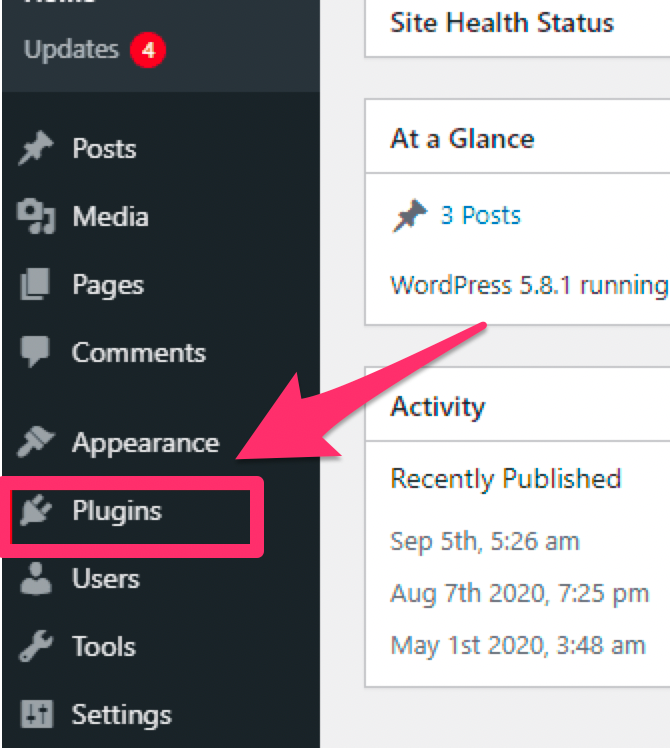
- Install and Activate the Plugin: Navigate to `Plugins > Add New`, then search for Yoast SEO, install, and activate it.
- Input Focus Keyphrase: Once activated, you’ll find a Yoast meta box below your post editor. Here, enter your main focus keyphrase, which is your primary keyword.
- Title and Meta Description: Use the Yoast box to enter a catchy title and a compelling meta description that includes the focus keyword.
- Add Related Keyphrases: Include similar keyphrases that might help you rank better and give your readers more context.
- Update Post: After you’ve filled in all the necessary fields, update your post to generate the needed HTML meta tags visible in the source code of your page. (source)
Steps to Set Up AIOSEO
Alternatively, if you opt for AIOSEO, you’ll follow a slightly different process:
- Edit Post Title: Create a title that starts with your keyword while making it attractive to readers.
- Customize Permalink: Be sure to eliminate stop words from URLs and add your main keyword for better SEO.
- Meta Description: Front-load your keyword while ensuring the description is under 160 characters to enhance visibility in search results.
- Preview SERP Snippet: Use the AIOSEO feature to preview how your post will show up in search engine results pages (SERP). (source)
Steps to Use META TAGS for SEO
If you choose the META TAGS for SEO plugin:
- Add New META Keywords: Select the type of keywords you’d like to apply (e.g., focus keywords or post titles) and add them to your posts, pages, or products directly.
- Manage Keywords for Better Coverage: This plugin allows you to cover various aspects of keywords efficiently, which helps in SEO performance. (source)
Optimize Post Elements with Keywords
Adding keywords isn’t just about placing them randomly throughout your content. Instead, you’ll want to ensure they are strategically integrated into various elements of your post. Here are the best practices to follow:
| Element | Best Practices | Examples/Length Limits |
|---|---|---|
| Post Title | Insert your main keyword organically at the start of the title, making it both relevant and compelling. | “Adding SEO Keywords to WordPress (Beginners Guide)” (under 60 chars) |
| URL/Permalink | Customize to include your keyword while removing unnecessary characters like dates and stop words. | Via AIOSEO post settings |
| Headings | Utilize H1 for your main title, and appropriate H2 and H3 tags to create sections and subsections with relevant keywords. | H2: “How to Add SEO Keywords in WordPress Posts”; H3: “Keywords in Headings” |
| Content Body | Incorporate your main keyword within the first 100 words; consider using variations or synonyms while prioritizing readability. | “WordPress SEO optimization”, “SEO keywords for WordPress” |
| Meta Title | Place the main keyword at the beginning of meta titles; ensure they are appealing. | Under 60 chars |
| Meta Description | Integrate 1-2 keywords in a description that highlights the benefits optimally while previewing in your chosen plugin. | “How to add SEO keywords in WordPress… attract traffic” (under 160 chars) |
Methods Without Plugins
For those looking to minimize plugin usage, you can add SEO keywords manually through custom coding. However, it’s vital to backup your website before making changes.
Custom Fields + PHP (per post/page)
You can use custom fields and some PHP code to integrate keywords into individual posts:
- Add Custom Field: Name the field “keywords” and define the values, like “wordpress seo without plugin”.
- Add PHP Code: Include the following code in your `functions.php` file:
add_action('wp_head', function () { if (is_single() || is_page()) { $meta_keywords = get_post_meta(get_the_ID(), 'keywords', true); if (!empty($meta_keywords)) { echo '<meta name="keywords" content="' . esc_attr($meta_keywords) . '">'; } } }); - Verify: To confirm the changes, check the page source code using Ctrl+U. (source)
Static Edit header.php (site-wide)
For broader implementation, modify the `header.php` file:
- Edit the Header: Navigate to Appearance > Theme File Editor > open `header.php` and insert:
<meta name="keywords" content="how to add keywords in wordpress without plugins, wordpress seo without plugin"> - Check Source: Save the changes and review the source code to ensure it reflects accurately. (source)
Note: While adding meta keywords has limited direct impact on modern rankings—Google ignores them—they can still provide value for other search engines and plugins. Always focus on producing compelling content as the main driver of your site’s SEO success. (source)
Additional Supporting Practices
Adding keywords is only the beginning. To truly make your WordPress site SEO-friendly, implement these additional practices:
- Set SEO-Friendly Permalinks: Make use of the “Post name” setting in permalinks for simpler URLs. (source)
- Optimize Images: Use descriptive filenames and incorporate alt text with your keywords to enhance visibility in image searches. (source)
- Use Categories and Tags: Maintaining clarity with categories and tags improves navigation and helps search engines understand your site structure. (source)
- Submit XML Sitemap: Regularly update and submit your XML sitemap to Google Search Console for better indexing of your content. (source)
Conclusion
Understanding how to add SEO keywords in WordPress is crucial for enhancing your site’s visibility and driving traffic. This process requires careful keyword research, effective use of SEO plugins, and strategic placement of keywords throughout your content. By implementing these techniques and practices, you position yourself to achieve better search rankings and ultimately reach your desired audience.
Embrace the power of SEO keywords, and watch your WordPress site flourish! Keep exploring, learning, and optimizing for a successful digital presence!
For more on enhancing your site’s SEO and effectiveness, check out previous posts like Maximizing the ROI of Professional Websites, How to Start an Ecommerce Website, and Understanding Google Trends.
If you’re looking for deeper insights on using WordPress, explore Starting an Ecommerce Website and Choosing the Best Hosting for Custom Websites for comprehensive advice.
Finally, learn about Technical SEO to get a stronger foothold in search rankings.
Frequently Asked Questions (FAQ)
How do I know which SEO plugin is best for me?
It depends on your requirements. Yoast SEO is popular for its comprehensive features and user-friendly interface, while Rank Math offers robust options with a slightly different approach.
What if I don’t want to use an SEO plugin?
You can manually edit your functions.php or header.php files to add SEO keywords, although this requires basic knowledge of PHP and WordPress themes.
Does adding more keywords always improve SEO?
Not necessarily. Keyword stuffing can hurt your rankings. Focus on natural placement and quality content that addresses user intent.
Can I rely solely on keywords for SEO success?
Keywords are important, but they are just one part of a broader SEO strategy that should include site speed optimization, mobile-friendliness, quality content, and backlinking.
How often should I update keywords in my posts?
Periodically revisit your content to ensure relevance and accuracy of keywords, especially if your topic niche or search trends change.
